n8n: Complete Self-Hosting Guide in 2026
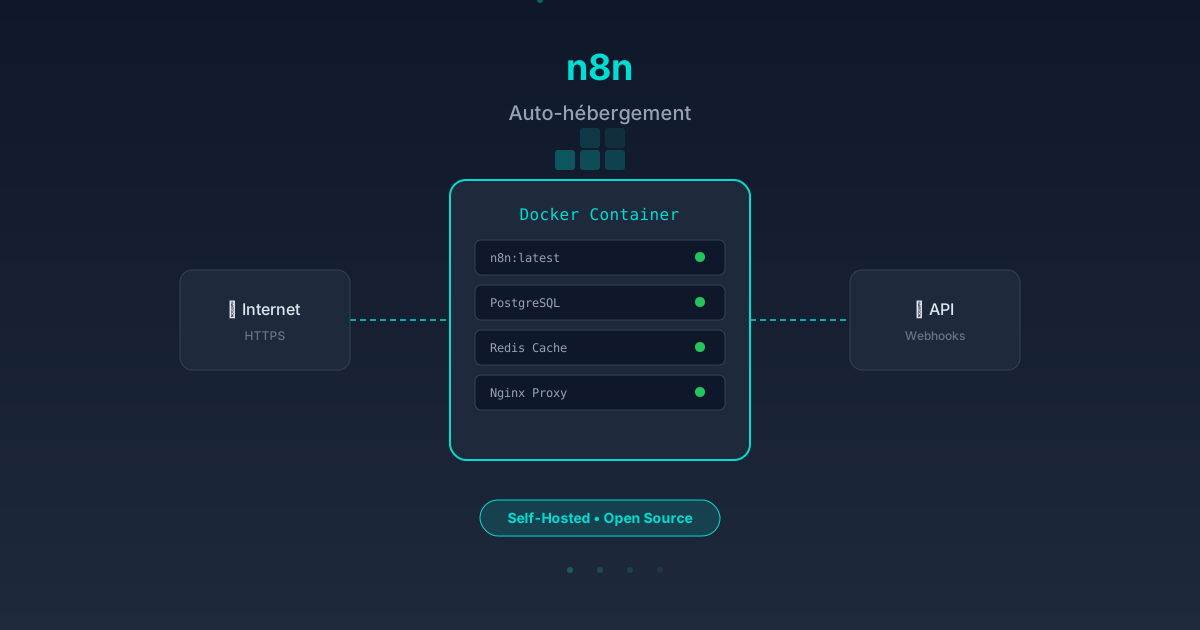
n8n is an open-source workflow automation platform that lets you connect APIs, services and applications with little to no code. Unlike Zapier or Make, n8n can be self-hosted, giving you full control over your data and unlimited flexibility.
This guide covers Docker installation, advanced configuration, instance hardening and building your first workflows.
Why Self-Host n8n
Self-hosting n8n offers several decisive advantages:
- Data control: no information passes through third-party servers
- Reduced cost: no monthly subscription, only the server to pay for
- Unlimited flexibility: uncapped executions, custom nodes
- Customization: full access to configuration and custom nodes
- Scalability: horizontal scaling possible with n8n clustering
Technical Prerequisites
Before starting the installation, verify the following requirements:
| Component | Minimum | Recommended |
|---|---|---|
| RAM | 1 GB | 4 GB |
| CPU | 1 vCPU | 2 vCPU |
| Disk | 10 GB SSD | 50 GB SSD |
| Docker | 20.10+ | Latest version |
| Docker Compose | v2+ | Latest version |
A VPS server (OVH, Hetzner, DigitalOcean) or a local machine running Linux (Ubuntu 22.04/24.04 recommended) works perfectly.
Installation with Docker
Method 1: Docker Compose (Recommended)
Create a docker-compose.yml file:
version: "3.8"

services:
  n8n:
    image: n8nio/n8n:latest
    container_name: n8n
    restart: unless-stopped
    ports:
      - "5678:5678"
    environment:
      - N8N_BASIC_AUTH_ACTIVE=true
      - N8N_BASIC_AUTH_USER=admin
      - N8N_BASIC_AUTH_PASSWORD=YourSecurePassword
      - N8N_HOST=n8n.yourdomain.com
      - N8N_PORT=5678
      - N8N_PROTOCOL=https
      - WEBHOOK_URL=https://n8n.yourdomain.com/
      - GENERIC_TIMEZONE=Europe/Paris
      - TZ=Europe/Paris
      - N8N_PAYLOAD_SIZE_MAX=64
      - NODE_FUNCTION_ALLOW_EXTERNAL=axios,moment
    volumes:
      - n8n_data:/home/node/.n8n
    networks:
      - n8n-net

volumes:
  n8n_data:
    driver: local

networks:
  n8n-net:
    driver: bridge
Start the instance:
docker compose up -d
Method 2: Docker CLI
docker run -d \
  --name n8n \
  --restart unless-stopped \
  -p 5678:5678 \
  -e N8N_BASIC_AUTH_ACTIVE=true \
  -e N8N_BASIC_AUTH_USER=admin \
  -e N8N_BASIC_AUTH_PASSWORD=YourSecurePassword \
  -e N8N_HOST=n8n.yourdomain.com \
  -e N8N_PROTOCOL=https \
  -e GENERIC_TIMEZONE=Europe/Paris \
  -v n8n_data:/home/node/.n8n \
  n8nio/n8n:latest
Method 3: with PostgreSQL Database
For production use, PostgreSQL is strongly recommended:
version: "3.8"

services:
  postgres:
    image: postgres:16-alpine
    container_name: n8n-postgres
    restart: unless-stopped
    environment:
      - POSTGRES_USER=n8n
      - POSTGRES_PASSWORD=YourDBPassword
      - POSTGRES_DB=n8n
    volumes:
      - postgres_data:/var/lib/postgresql/data
    networks:
      - n8n-net

  n8n:
    image: n8nio/n8n:latest
    container_name: n8n
    restart: unless-stopped
    depends_on:
      - postgres
    ports:
      - "5678:5678"
    environment:
      - DB_TYPE=postgresdb
      - DB_POSTGRESDB_HOST=postgres
      - DB_POSTGRESDB_PORT=5432
      - DB_POSTGRESDB_DATABASE=n8n
      - DB_POSTGRESDB_USER=n8n
      - DB_POSTGRESDB_PASSWORD=YourDBPassword
      - N8N_BASIC_AUTH_ACTIVE=true
      - N8N_BASIC_AUTH_USER=admin
      - N8N_BASIC_AUTH_PASSWORD=YourSecurePassword
      - N8N_HOST=n8n.yourdomain.com
      - N8N_PROTOCOL=https
      - WEBHOOK_URL=https://n8n.yourdomain.com/
      - GENERIC_TIMEZONE=Europe/Paris
      - EXECUTIONS_DATA_PRUNE=true
      - EXECUTIONS_DATA_MAX_AGE=168
    volumes:
      - n8n_data:/home/node/.n8n
    networks:
      - n8n-net

volumes:
  n8n_data:
  postgres_data:

networks:
  n8n-net:
    driver: bridge
Configuration and Hardening
Reverse Proxy with Nginx + SSL
Install Certbot and Nginx:
sudo apt update && sudo apt install -y nginx certbot python3-certbot-nginx
Nginx configuration (/etc/nginx/sites-available/n8n):
server {
    listen 80;
    server_name n8n.yourdomain.com;

    location / {
        proxy_pass http://127.0.0.1:5678;
        proxy_http_version 1.1;
        proxy_set_header Upgrade $http_upgrade;
        proxy_set_header Connection "upgrade";
        proxy_set_header Host $host;
        proxy_set_header X-Real-IP $remote_addr;
        proxy_set_header X-Forwarded-For $proxy_add_x_forwarded_for;
        proxy_set_header X-Forwarded-Proto $scheme;
        proxy_buffering off;
        proxy_cache off;
        chunked_transfer_encoding off;
    }
}
Enable SSL:
sudo certbot --nginx -d n8n.yourdomain.com
Essential Environment Variables
| Variable | Description | Recommended Value |
|---|---|---|
N8N_ENCRYPTION_KEY |
Credential encryption key | Random string, 32+ chars |
EXECUTIONS_DATA_PRUNE |
Auto-prune executions | true |
EXECUTIONS_DATA_MAX_AGE |
Max execution age (hours) | 168 (7 days) |
N8N_PAYLOAD_SIZE_MAX |
Max payload size (MB) | 64 |
N8N_METRICS |
Enable Prometheus metrics | true |
N8N_DIAGNOSTICS_ENABLED |
Telemetry | false (private) |
Generating an Encryption Key
openssl rand -hex 32
Add this value to the docker-compose.yml:
- N8N_ENCRYPTION_KEY=the_generated_key_here
Important: never change this key after the first startup. Existing credentials would become unreadable.
Building Your First Workflow
Workflow 1: Slack Notification on New Google Sheets Row
- Connect to the n8n interface at
https://n8n.yourdomain.com - Click "New Workflow"
- Add a Google Sheets Trigger node and configure the spreadsheet and sheet to monitor
- Add a Slack node and select the "Send Message" action
- Map the Sheets columns into the Slack message
- Click "Test Workflow" then "Active"
Workflow 2: Automatic Synchronization Between Two APIs
This workflow illustrates n8n's power for connecting systems:
[Webhook] → [HTTP Request - Source API] → [Set Node - Transformation] → [HTTP Request - Target API] → [Response]
- Webhook: entry point to trigger the workflow
- HTTP Request (source): fetch data from the source API (GET)
- Set: transform and filter the data
- HTTP Request (target): send transformed data to the target API (POST/PUT)
- Respond to Webhook: return an acknowledgment
Workflow 3: Automated Scraping and Storage
[Cron Trigger - Daily] → [HTTP Request - Web Page] → [HTML Extract] → [Code Node - Parsing] → [PostgreSQL - Insert] → [Slack - Notification]
This workflow runs automatically every day, extracts data from a web page, structures it and stores it in a database.
Essential Nodes to Know
n8n offers over 400 built-in nodes. Here are the most useful ones:
- Webhook: trigger a workflow via HTTP
- HTTP Request: call any REST API
- Code Node: run custom JavaScript
- IF/Switch: conditional logic
- Set: transform data
- Merge: combine multiple data streams
- Loop: iterate over lists
- Wait: pause execution
- Error Trigger: catch global errors
- Sub-Workflow: call a workflow from another
Backup and Maintenance
Automatic Backup
Add a cron job on the host server:
# Backup every day at 3 AM
0 3 * * * docker exec n8n-postgres pg_dump -U n8n n8n | gzip > /backups/n8n_$(date +\%Y\%m\%d).sql.gz
# Delete backups older than 30 days
0 4 * * * find /backups -name "n8n_*.sql.gz" -mtime +30 -delete
Restoration
gunzip < /backups/n8n_20260414.sql.gz | docker exec -i n8n-postgres psql -U n8n n8n
Updates
docker compose pull
docker compose up -d
Check n8n release notes before each major update.
Monitoring
Enable Prometheus metrics and configure Grafana:
- N8N_METRICS=true
Endpoint: https://n8n.yourdomain.com/metrics
FAQ
Is self-hosted n8n really free?
Yes, n8n is licensed under "Fair-code" (sustainable use). Self-hosting is free for internal use. Only using n8n as a commercial service (SaaS) requires a paid license. All built-in nodes are available without execution limits.
What are the differences between n8n and Zapier?
n8n offers full data control (self-hosting), unlimited executions, the ability to create custom nodes in JavaScript, and reduced costs to just the server. Zapier has a more polished interface but limits executions based on the plan and data passes through their servers.
How do I add custom nodes?
Create a JavaScript file in the ~/.n8n/custom/ directory or use the NODE_FUNCTION_ALLOW_EXTERNAL variable. For complete nodes, n8n provides a custom node template. The node must export a class with execute and description methods.
Is it possible to scale n8n horizontally?
Yes, since version 1.0, n8n supports "queue mode" with Redis for horizontal scaling. Multiple n8n instances can process workflows in parallel, ideal for high loads. The configuration requires a message broker (Redis or RabbitMQ).
Is Docker required to self-host n8n?
No, n8n can be installed directly with Node.js (npm install -g n8n), but Docker significantly simplifies dependency management, updates and isolation. Docker is the recommended method by the maintainers and the community.
Published on April 14, 2026 by My Integration.